
 Google announced the launch of Version 2 of Google Analytics today. Over the next few weeks Google will upgrade current GA users to the new version. Many of the most frequent GA users (big or small) already have access to V2 as of this morning (please log into your account and check).
Version 2 is so radically different and provides such a compelling value proposition to users of web analytics that I am excited to write a blog post about a product (the first time I have done this in 11 months of existence of this blog).
I am also the Analytics Evangelist for Google but you’ll see that I am so excited about GA V2 not because I consult for Google but because I believe that v2 is a leap forward for all of its current users and a new standard for the industry when it comes to interacting complex web analytics data. Please share with me what you think, at the end of this post.
Also while this post is about GA V2 it contains examples of the best practices I have talked about on this blog frequently, I have just tried to do those with GA here. So if you use Omniture or WebTrends or WebSideStory or HBX or Visual Sciences or ClickTracks or indexTools or NetInsight or any other piece of web analytics software (and care only a little about GA) you’ll still find tangible examples of analysis you can do to find actionable insights. You can follow along and replicate these with your web analytics tool.
Here are the five things you should do the first time you log into GA V2:
Summary:
- Notice the awesome new data interaction model.
- Take the enhanced “data discoverability” for a spin.
- Context is king! Find your context quickly.
- Ahh…. Segmentation is just a step away.
- Upgraded goodies: Schedule and email any report or dashboards, Better site overlay, Much nicer page level reporting and more.
Details:
# 1: Notice the awesome new data interaction model.
One more of most dramatic changes to Google Analytics V2 is the new immersive data interaction model. It sets a new benchmark for how users interact with data. It shifts the model from a few digging long and hard to find insights to the many not having to dig a lot to find first blush insights and also having the power to easily and quickly dig deeper if they want to.
The V2 UI is completely new and the center piece of this launch. Every where from totally customizable dashboards to the overview reports to the presentation of the data and more “stories� that go with the reports now. The tool is easier to use, key metrics jump out to you and it is ever more easy to understand what is going one (if only all sexiness in the world was so productive! : )).
Here’s the new dashboard (notice the use of colors, font, content groupings etc in service of quickly communicating with you):

All images in this post are linked to slightly higher resolution images, go ahead and click on all the images . The screenshots represent real data for this blog.
Here is the new presentation of the split between New vs. Returning visitors (notice the small “story� under the graph, the use of colors and layout of the table, and a quick and easy way view that communicates not just what happened last month but also a eye catching graph that tells us “performance� vs site average):

As you’ll use the tool you’ll see more and more examples of effective communication of data via a very well thought out UI that is perhaps the best one today amongst all web analytics tools.
People underestimate the value of being pretty. Our world of web analytics is already too complex and data is hard to parse and insights harder still to get. Effective presentation of data (ok pretty!) is greatly accretive to helping understand trends and insights and significantly increase ease of use both for a lay person and the super analyst.
# 2: Take the enhanced “data discoverability” for a spin.
It is both a blessing and a curse that there so much data that we have access to. It means both that we can track and report a lot but it also means that it is a non-trivial challenge to find all the metrics/pieces of data you need to find the nuggets of actionable insights.
The new version of Google Analytics does a great job of addressing this challenge by immensely improving, what I call, data discoverability. The key data you need is not hidden sixteen clicks away. Most of it has been surfaced so that it is staring at you already or you can find it in two clicks.
For example look at the Visitors Overview (click Visitors on the left navigation in GA):

Notice that not only do you get a trend of the Visitors to the site but you can also get all your key metrics in one “page view”. Further more the next action is within easy reach, either click on one of the many metrics you see under the graph or there are Visitor Segmentation options being suggested to you. You quickly get the whole story but you also learn what else is there.
Did you notice the lovely sparklines? Somewhere Edward Tufte is smiling. :)
Here’s another example. I am deeper into my reports and want to see where my traffic is coming from. Easy report from any tool (and a report you should constantly look at).

On one page you have three interesting ways to discover data (and find insights):
1) You can easily switch the “master metric trend” to one of the other metrics (and get a quick glimpse of the performance of your referring sites).
2) You can easily switch between “standard metrics” to “bottom-line metrics” (Conversion). Compare image below to image above, one click access to clickstream (behavior) and outcomes.

3) Oh your standard metrics are always there, even though you were looking for Visits, to prompt you to dig deeper (notice that Visits are doing ok but something happened in May that caused a increase in content consumption – pages/visit and time on site – and caused lowered bounce rates).
As you use the tool you’ll find many little and big ways in which the new UI makes it easier for you to drill down, drill up and drill around.
# 3 Context is king! Find your context quickly.
On this blog we have highlighted the importance of having relevant context to helping you make optimal decisions. The recent how should analysts spend their day post indicated that 20% of the time should be dedicated to staying plugged into the context.
The new version of Google Analytics provides several features that help you get relevant context to the performance of your website metrics. I think both of these make it significantly easier for novices and experts to understand their data (which might lead to more insights). Let me share a couple of examples……
In my emetrics presentations I have talked about how key metrics are often “lonely” and need friends to highlight important opportunities and occurrences. No matter where you go in the new Google Analytics your metrics won’t be “lonely”, you won’t find too many reports where you only look at one metric by itself. Lots of thought has been put into showing key metrics in context.
Here is a example, I am looking for the conversion rate for the last month and sure enough it is easy to fine (click on traffic sources, then Keywords, then switch Visits for the graph into Goal Conversion Rate):

Now notice something cool, not only do you have a trend for conversion rate on your website but in the Site Usage area of your report you can see your key metrics for the Search Traffic (numbers in bold black) but, this is fun, notice that you can also see (in smaller grey font) the comparison of your search metrics with your Site Metrics. You easily get important context such as “the % of new visitors is higher for search but their site page views per visit is lower”. Often we buy into the hype of search engines because we might only look at one metric or the other, now you can get the whole picture, quickly.
And you don’t lose that valuable context as you drill down, in this case I drill down to looking at the Conversion Rate for the top keyword from search engines:

Even at a quick glance I know exactly how this keyword is performing, not just for Conversion Rate but all other important metrics (this is the top performing keyword but only contributes 1.41% of the site visits!).
Also data discoverability continues to be enhanced, notice right under the keyword are options to see performance for Total, Paid (PPC / SEM) and Non-Paid (Organic – SEO). You never have to leave the “page” to do all this.
But perhaps one of the easiest way for you to get context about your performance is to simply compare it to a, well, comparable time period. With Version 2 this is easier than ever. You still have to boring calendar you can choose your time periods from, but what I like better is the new Timeline feature where I have the option to using two slides and drag them to choose my date range. Very efficient…..
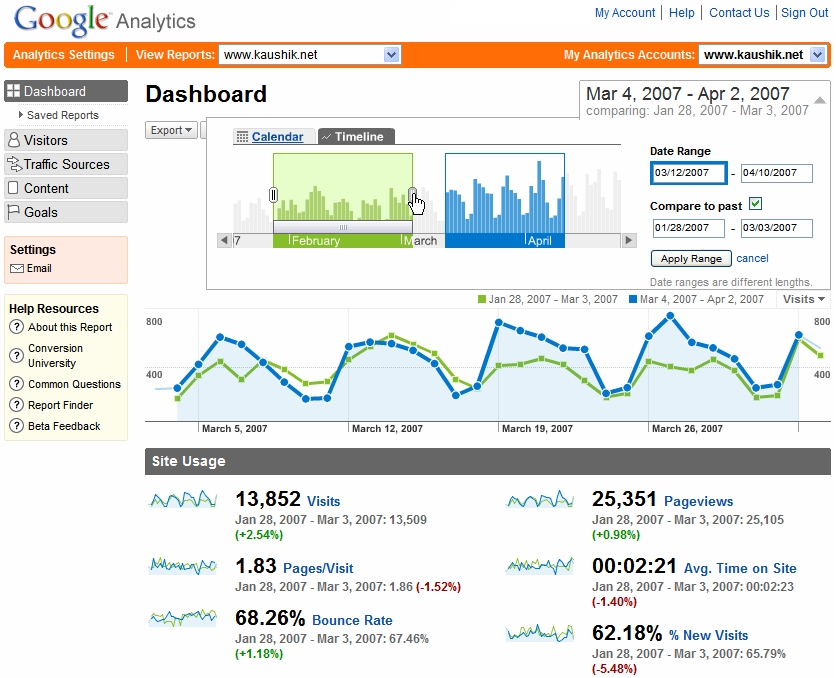
As soon as I hit Apply Range I can see at a glance trend of the main metric I was looking at for the two time periods (Visits) but notice the changes for all other metrics. My sparkline trends now show the two time periods. I also have automated raw numbers for my key metrics and in helpful Red and Green indicators how each metric has performed over those two time periods.
Again in this case you can understand your performance better and even at this high level the questions you should now ask of your data will bubble up.
The nice thing is that once you choose your timeline for comparison in any report, that comparison then permeates all your reports so that you can start at a high level and drill down and still have the valuable context. Here for example is a drill down to sources of traffic to the site where I find the same timeline comparison…….

You can hover your mouse on the timeline to get daily performance, or you can easily look at the deltas for the key metrics (click on the image above to see how the context continues for your top sources and keywords, all on the same page – remember the goal is for you not to dig around to get actionable insights).
# 4: Ahh…. Segmentation is just a step away.
Most of the reports you’ll see in Version 2 of Google Analytics provide easy access to segmentation options. For example in this report while looking at the Direct Traffic you can simply click on arrow next to Segment and you can see lots of segmentation options (including by some Value that you can define and pass to GA):

And here is another example for when you are deep in the bowels of doing your long term analysis you can quickly see how these options (in a composite image) would be very helpful:
# 5: Upgraded goodies: Schedule and email reports/dashboards, Better site overlay, Much nicer page level reporting and more.
You now have a very convenient to share your analysis / insights with a wider group of people in your organization. Just select any report (even ones you have segmented and timeline compared etc) and click the Email button…..

As you can see above you have the ability to write a custom message, choose a convenient format (including extremely high resolution PDF’s) and the schedule.
Site overlay gets a v2 upgrade as well, notice something new…..

The site overlay report not only opens in a new window (where you can simply “surf your site”) but on the top you see a new “navigational bar” that allows you to switch your choices of what you want your site overlay to display. In the screen shot above that Clicks, Goal Value (How much is each link driven in terms of goal revenue), Goals 1 and 2 (click density for driving to conversion goals that you have set for your website). You can now visually get a great picture of how each page is performing.
Site overlay is one of the most underutilized reports of any tool, with v2 it gets better in Google Analytics and builds a foundation for future enhancements.
Page level analysis has also gotten easier and much better in V2. As you’ll see in the screenshot below you can choose the page you want and then look at a detailed summary or navigation summary or entrance paths to the page or external sources who referred traffic to a page or the keywords that drove traffic to a page from a search engine.

The Entrance Paths is particularly interesting. For example how many people came to the product page, where did they go next and of those how many ended up in the shopping cart and if not there then where did they end up? Good to understand and actionable (even though I am not a huge fan of site level path analysis, that is not a good use of time).
Novice users (or experienced users!) will find it very convenient to locate help and definitions throughout the application. Just click on the question mark icon next to any metric you see or the Conversion University link next to any report.

Let us all resolve never to get confused about Hits, Visits, Visitors and Unique Visitors!! : )
So what should you do now? Can’t let you get away without action items now:
- If you have used Google Analytics thus far then try the analysis above and give the new reports a spin, I guarantee that you’ll find the tool significantly easier to use and you’ll discover your own little and big trends faster.
- If you have never used Google Analytics before then now is a good time to try. It still comes free (sign up here) and you’ll see what a free tool can do that your current web analytics tool can’t. You may or may not decide to use cancel your current tool subscription, that is a very personal choice, but you’ll make that decision for a informed position.
Closing thought: Having been such a fan of Measure Map I am super impressed with what Jeff Veen and his team have delivered, something that is a revolutionary step forward when it comes to complex web data and how we interact with that data in our quest to find insights. But I am a greed person and want a lot more! :) I am excited for the future possibilities of innovation and invention on top of this new platform.
What do you all think? Have you tried V2? Are you excited about what you have read above (if you made it this far)? Was this post by a Analytics Evangelist or a super excited web analytics geek/blogger? Please share your thoughts and feedback via comments, I would love to hear what you all have to say. Thanks.
[Like this post? For more posts like this please click here.]















207 thoughts on “Google Analytics Is Re-Launched: Do These Five Things First In V2”
How do I get the hourly view that was available in the old version. I used to compare intra-day trends (week-over-week) and can’t seem to do this in the new version. Is there a way to look at the hourly trends (e.g. Total conversion) for today vs last week?
I’m impressed. The old interface was one of the worst interfaces for any web site I have ever seen, even if it was powerful.
You can definitely see the MeasureMap influence here. Now the question is, what is going to happen to MM? The new GA is still very geared towards business usage. Is MM going to be re-released with some of these new features but in a format more geared towards bloggers?
Sticky reports! Email options! Bliss! :)
There are still a couple bugs to be ironed out such as the account selection dropdown.
reminds me of a post called “Hi, my name is Avinash, what makes you unique?” : Google just raised the bar a heck of a lot for smaller vendors
Cheers Avinash, and thanks for the walkthrough!
Julien
I’m really enjoying the new interface, and this is a great post reviewing all the features (I just did a bit of a guided tour using your five points). Fantastic stuff all round.
Great step by step tutorial. I really needed something like this in order not to get lost in the new features :)
Pingback: Razvan Antonescu » Blog Archive » Google Analytics v2
Great post Avinash. All I can say is Wow! I have been waiting for this ever since Google acquired Measuremap. One of the biggest issues with the old interface was getting to actionable insights, particularly for those who had no prior experience of web analytics. This upgrade will make it much easier for novices and experts alike.
Nice screenshots! ***Drooling***
Pingback: Uncommon Uses - Twitter: Product Announcements at ExperienceCurve
Pingback: wanalytics » Blog Archive » Google stellt Analytics V2 auf dem Emetrics Summit in San Francisco vor
Pingback: Google Finance, Google Analytics, Google Reader and a User Drops Google Forever
Pingback: No Time to Blog - Google Analytics V2
Pingback: Google Analytics passe à la V2 « ecosphere
Pingback: Technology Evangelist
Excellent write up Avinash! Now I just have to wait till my account is upgraded. I’m not on V2 yet. I look forward to giving this version a spin.
Does this change require any quick edits at the printer for you?
Pingback: google analytics is re-launched › smackfoo.com
Excellent post Avinash. Learned few tricks here :)
Pingback: popxpop
Pingback: Information Management Weblog
those sparklines look amazingly clear, and ther is no doubt that Tufte would be proud. Are you using an existing sparkline implementation, and/or is that sparkline code something you are interested in contributing back to the community?
Pingback: Knicks49.com » Blog Archive » Google Analytics New Look
Of course, the new GA interface is very smooth and cool. That’s the best description I can give for it.
I was very impressed with how fast I was able to pick it up (we were fortunate to have one of our accounts with access to V2). Normally it takes a long time to get comfortable or used to new interfaces…or so it seems. After about a half-hour of just literally clicking around, I was like “I think I got it”. I went into one of our current accounts, and you can just feel the difference.
I’m a big fan of nice and big fonts (I want to READ the text), and also nice colors. It’s amazing how much of an impact that makes.
But the best thing of all that I haven’t seen anyone say yet – this is still FREE!!! (Unless I totally missed something). I mean, if you sell an analytics software or program, you may want to check to make sure it’s darn good.
Also, if I’m not mistaken, nothing has changed as far as URL or Site Coding…so no hassles there (is this accurate?)
I’m not sure how you’re deciding which accounts to upgrade… But from one ‘community evangelist’ to another, I just wanted to suggest that upgrading the accounts of influential bloggers, etc would be a smart move.
I went to write a review today for my blog but was disappointed to find that my account hasn’t been upgraded. I ended up writing a general piece, which got listed on TechMeme, but it was a shame not to have the new site in front of me to be able to give it a real test-drive.
Pingback: blog.wohlrapp.com » Jeffrey Veen at Google working on new Analytics UI
Pingback: The Software Abstractions Blog
Pingback: O3noBLOG
Pingback: The new Google Analytics at fresh + new
Pingback: Webanalyse & SEO - News » Google Analytics V2
???????????? ??? 5dig.net (?? digg), ?????????
@Joe Teixeira: You are right there is no need to change anything in the site coding. It transferred seamlessly for me.
Oh my goodness…
I have some accounts on the old version and some on the new and I’m already starting to sulk like a spoilt child because I want the new interface on all of them NOW. The improvement is that big.
We use a combination of Google Analytics with Clicktracks and again and again I’ve noticed users new to GA stumbling around the GA interface as if it was a maze. (It WAS a maze.) This is so much better and, like Clicktracks, points new users in the direction of insights rather than just leaving them to contend with a load of reports.
The fact that the email facility even includes the ability to add in some kind of commentary also strikes me as really good. It looks to me as if the new version takes away a chunk of the drudgery in producing reports and even provides a subtle prompt to use the extra time for a few words of analysis.
But I join Jason in querying what has happened with the date range features. The new interface is so much better for most purposes, I agree. And I like the way that if you select a week using the left of the calendar, for example, the default time line still shows the context surrounding the week. The date comparison functions are so much better now and that is a critical improvement.
But what happened to the different time display options, such as monthly/hourly? Where is the ever-so-useful ‘weekly’ which was strangely lacking in the old version? And what has happened to the old ability to select ‘all the Mondays’ by clicking on the top of the relevant column in the calendar (even if only for a single month at a time)?
Perhaps this is just a case of me not spotting options which have been moved. It certainly took a while to find hidden features in the old interface, so I can hardly complain.
To be clear: I’m not complaining. I am hugely impressed. I am also delighted that you’ve provided us with a post which contains both a great guided tour to how to use something and a series of reminders about what we might/should be using it for. Once again, thanks, Avinash!
Pingback: Google Analytics updated to 2 at somefoolwitha.com
It is really late in the night, my apologies for the short replies:
Anne: If you mean the book then it is too late! :)
Jehiah: That is a great suggestion, I’ll add to the list but as you can imagine I don’t have a definitive answer so early in the process.
Joe Teixeira: The tool is completely free and will remain so. You don’t have to change anything, just sit tight and wait for the welcome message. :)
Ben: I understanding your prespective completely. Google wanted to make sure that the rollout is done in a fair way. I assure you that the roll out will scale very quickly.
Tim: You have to options to change the date, I like the timeline feature better but in this image you’ll see Calendar and using that you can do all of the features that you have been used to in terms of time options.
Thanks to you all for the kind words and support, it is very welcome and deeply appreciated. As you use the tool please feel free to write to me here or via email to share your experiences.
-Avinash.
Pingback: 30 seconds to Tambu · Google Analytics si rinnova!
Pingback: Prometeo
Pingback: rkgblog
Pingback: Wolf’s Little Store » Blog Archive » Interessant leesvoer van de laatste dag(en)
Pingback: Google Analytics announces a redesign | <img /> is Everything
Pingback: Bram.us » Pimp My Google Analytics!
Pingback: ecommerce-well.com
@Avinash: of course your swamped with a million things to do and a million and a half new requests… thats the sign of a good launch!
I agree with you, it is very good, although as an advanced user, and as you noticed, there are a lot missing for serious web analytics work on large sites, but I like it because it kind of sets the standard of simplicity which is not the case with Web analytics tools.
Thanks for the post. Do you ever sleep?!
Marty
Pingback: The Way The Internet Should Be! » Blog Archive » Step-By-Step Guide to Google Analytics’ New Interface
Avinash – awesome stuff.
You have certainly contributed to the usability and analysis that Google offers. This was needed in order to stay competitive, and the result was to set the bar very high for other vendors, especially the high-priced ones that don’t offer similar features. I even have to admit that this may even make me a fan. Great job!
Avinash,
I noticed that in the morning and realised Google just wrote off $30 million urchin investment.
We offer a custom reporting console to our clients – for free. We boasted features such as any data couple of clicks away – multi selection of variables and their impact on the visits, pageviews, bounce rates and conversions.
We are threatened now as i can foresee v3 of it offering customizable columns and multiselect options.
So are the commercial web analytics firms imo.
To my mind, the damn good features to have in the next version are
1. Solid Trend comparision
2. Multi-selection of data variables
3. Some kind of combinatorial impact on the results. (say with all the data,GA runs a multivariate analysis and finds that some variable or group of variables have significantly influenced the results/goals and puts up in the dashboard or as an alert)
I couldn’t find city level analysis though. Some kind of time zones (intra-day) will also help imo. (currently adwords gives an hourly report at the account level, but if you crack it at all variable level, it would be a great job)
But in all its a great job!! my post sometime in the morning https://www.valuepitch.com/blog/2007/05/google-analytics-now-looks-like-google.html
Cheers,
Venkat.
My account isn’t yet upgraded, so I’m eagerly awaiting the new version. It does look great and I may even use it on some commercial sites now that it’s so much better.
However, the old version has a number of severe limitations (such as only 4 definable goals) and I’m wondering whether this has been addressed?
Avinash, these are great news. Being impressed with V1, I expect to love new V2 UI.
I guess, this UI enhancement allows more flexibility in data access.
Hi Avinash,
This is a pretty landmark event for the web analtyics community, since it shortens the gap between marketing folk and the analytics geeks.
Here are a few of my thoughts:
– The speed of the tool was the first thing I noticed. Cross-segmentation/sub-relation used to take way longer than necessary on my high-speed fancy corporate line. This finally keeps up with the speed of my questions (“Ooh, but what about…”)
– I love the slick presentation and improved data discoverability. The fewer screens between me and potential insight, the more efficient I can be. Plus, now I can just use screen shots for my presentations and not apologize for how they look :-)
– The trend/sparkline/context feature is so obvious that I’m not sure why it hadn’t been implemented earlier.
– Finally, customizable dashboards!
I’d also like to issue some challenges to Google for v3:
– Finish up the ability to import cost data from Yahoo, MSN and other paid channels. I know you’re working on it, but we need it now!
– Bring on more advanced segmentation. As I’m fond of saying, “Averages Lie.” I think ClickTracks does the best job of simplifying segmentation and GA needs to step it up.
– Let me put in more of my context. When I look at the data, it’s easy for me to say “Oh, well, the server was down that day.” or “That was the start of our big marketing campaign.” Other people won’t necessarily know those things, but I’d like to record them for posterity.
– Focus on actionability. Now that I have the data, what does it mean and what should I do about it? I’m not saying that we can automate analysts (at least, I hope we can’t), but novice analytics users still need help separating data from insight. I think V2 gets us closer, but the closer we get to pointing out RELEVANCE, the better it will be.
Finally, I’m curious how this release will ripple through the industry:
– Will small market vendors like ClickTracks be forced to move to mid-market to survive?
– How long will it be before larger vendors scramble to update their UI to be just as slick?
– How will we ever recruit enough people know that everyone will use analytics? :-)
I’d love to hear your thoughts.
-Alex
acohen AT commerce360 DOT com
Pingback: Dan Blank: Publishing, Innovation and the Web » Blog Archive » Google Analytics Relaunches
All I can say: Wow! The new interface is a major leap forward. How this will affect other tools vendors is anyone’s guess… I know that most of our clients will love this new tool set, but there’s still the need for process and people, which is where folks like our company come in… ;->
Keep up the great job!
Hi, the new look is very slick and appealing, but the most common thing I do with Analytics is click on the current day to see if I’m having a good day or a bad day. If I can’t see it hourly then it isn’t much help.
I’d like to see that feature. look at my hourly pagecounts and tell me if I’m above average, highest ever, below average, etc….
Avinash
Must be the longest post you have mad so far… but great!
This upgrade will rock when it hits a lot of GA users as well as competitors dito!
See that you have recieved a lot of comments in exotic languages. It really spins around!
Nice!
Pingback: » A kick in the nuts - Le techno-blogue à Steph!
Pingback: Google Analytics i Ny og Bedre Utgave | Black Hat SEO
Pingback: Google Analytics V2: more details « WebAnalytics.be Blog
Excellent post as always Avinash. I especially like the timeline function instead of being forced to use the calendar function. As far as your question, I thought you presented the upgrade in a fair way, and that you didn’t appear to be telling everyone to call up Orem and tell them that they’re cancelling Site Catalyst. I would also applaud the Google guys for the speed of reporting. It truly is a great product. Thanks again!
Avinash,
I’ve noticed that some archipelagos cannot be found in any of the Geo Map Overlays. For example, the Azores and Madeira, which are of Portugal. Also I don’t see the Bahamas or Bermuda.
Are the stats for these island groups just lumped in together with the country that governs them?
Pingback: a triumph for slothful indolence and lethargy » Andy C
Pingback: World Wide Web-ul zilei - 9 Mai 2007 | Bani pe net - by Cotiso
Great article. Please check your grammar before posting. You have several mistakes that make the article hard to read.
Pingback: Ny version av Google Analytics rullas ut » SemiCow
Pingback: Google Analytics Upgrade
Pingback: mundell.org – My del.icio.us bookmarks for May 8th
Pingback: Primeras impresiones en la blogosfera sobre Google Analytics 2 at analistaCRM
Pingback: Meet The New Google Analytics - Dawud Miracle @ dmiracle.com - (formerly Healthy WebDesign)
Avinash,
Are those chart styles available commercially or via open source?
Cheers!
Pingback: take one onion by Gavin Bell
Pingback: JeremyAnderson.com » Blog Archive » ReGoogled
Hi Avinash,
The V2 does provides some new and better features.
I’d like to see that it keeps the function of exporting the whole report to Excel so that I can run macro to decompose the search phrases, etc. The V2 can only export rows on the screen. I’d also like it to keep the original calendar options of “daily” and “hourly”. This is useful for server capactiy planning.
Pingback: Latest Gadget News - MediaGeek Spot » Google Analytics: Should Google be minding YOUR Web business?
is it me or can’t you go back up one level in the content drilldown report??
I can’t click the breadcrumb showing what im viewing… and i must be blind, but can’t a button or link for 1 level up…?
Pingback: links van 9 mei 2007 at Andhi.be
Pingback: t8d blog » Blog Archive » Google Analytics relaunched
Wei Zhang and I seem to have similar needs… On reading that comment I went and investigated the keyword report export.
The new version is great in the way that it combines data from several tabs, but I too will greatly miss the ability to get a file containing all the key phrases. It was ideal for mining activities and also for compiling reports on keyword trends over time — trying to spot the future stars as they start to rise.
I realise this is a bit of a “me too” comment. Is there a better way of providing this kind of feedback, I wonder? I went to look in the Analytics Helps Groups and there are threads scattered all over the place.
I think it might be useful to add a specific group to discuss the upgrade. The new “Analytics Integrations” discussions don’t seem to have attracted much interest, but I bet this subject would!
Great post, I am thrilled to see the upgrades!
Great stuff… but, if I can only export reports of 100 rows it ain’t a goer. Anyone have an idea whether this is a permanent ‘feature’, or will it be corrected?
Avinash,
Thanks for the great overview of the new interface. I referenced your post in my company’s latest blog post: Views on the new Google Analytics
Personally, I don’t get the hype. I think everyone is “google-eyed” becuase it’s Google. What about ClickTracks, or VisiStat? Their interfaces, IMHO, are still far advanced over this yet you don’t see this type of cultic fanfare with them. AND they are real-time.
Has anyone ever put any thought into how this is the Fox watching the Hen House? Well, since this is a rah-rah session for Google, I’ll be shocked if my comments are even allowed. Hopefully the moderator is open to alternative views :)
Pingback: Curious About Google Analytics Version 2? Look No Further.
Hi Avinash,
Is there an easy way to do content grouping with v2? For example, can I see path analysis for a class of pages (e.g. all product pages)? See: https://searchenginewatch.com/showPage.html?page=3625614
Thanks!
Eric
Pingback: marnik.org » links for 2007-05-10
Pingback: Lagartiando » Google Analytics
Hi Avinash,
I found some discrepancies between data from V1 and V2. When I use “Content drilldown” and go to url/folder level and choose “visitor type” from “segment” drop down menu, I get numbers of both return and new visitors. This data is different from I got in the old version. Is this because this data in V2 is “based on sampled data” and that from version1 is not? I also noticed that variance ranges are provided in the new version. I found that the difference between two sets of data is larger than the variance range it gives. Can you tell me the rationale behind this discrepancy? thanks
I can’t tell you how ecstatic I am about this. The first thing I did was call my clients to tell them to look at their new stats!
I love the new map where I can zoom in on a specific region. And the PDF output is a godsend and will help me in justifying so many things to clients and partners!
Quite simply put, fabulous UI, very intuitive, printed pdf reports look stellar, if you’re not using Google analytics yet, you should be.
Jared: Dissent, critique, alternative points of view are very welcome. The only criteria is that they stay on the point if possible and not get personal. :)
Anyone reading this blog will be know of my fondness for ClickTracks, it is a great tool and I talk about it here in glowing terms. I don’t know VisiStat very well (though I did play with the demo).
I think, remember there are ten screenshots on this blog to every one of GA, that V2 provides a superior data interaction model than that of ClickTracks in a number of ways and anyone that wants standard web analytics reporting will be hard pressed to find a more compelling alternative to V2. I invite my friend John Marshall to chime in and share his thoughts.
CT retains an edge for Analysts becuase of its far superior Advanced Segmentation ability. CT also remains my second choice for its own wonderful data interaction model.
As regards the Foxes watching the Hens, here are two links with my personal point of view:
Google AdWords plus Google Analytics: Market Manipulation and Possibility of Mischief ? (Dated 08/31/06)
Podcast: Google, Evangelism, Data Privacy, Analytics, Yahoo! & Getting The “Web” (After Google’s Analytics Evangelist, dated 05/03/07)
Each person will make up their own mind on this issue based on the information they have available to them and based on their own life experiences. Here is a link to someone who has a alternative point of view to mine :
Google Analytics: Should Google be minding YOUR Web business?
Rather than taking any one person’s perspective I encourage you to be open to different points of view and make up your own mind.
Thanks so much for your comment, and in the future please do not hesitate to share your perspective (your email address is now on the pre-approved list so your comment, no matter what you say, will not be in the moderation queue).
-Avinash.
Everyone: For help with V2, or to report bugs / issues, please use this link:
Ask a Question
Please click on Reporting/Data Issues or Other (or other choices as appropriate). Each request will be read and replied to by the Google Analytics Tech Support team in a timely manner.
Wei: Your feedback on hourly and daily calendar option id duly noted and has been added to the consideration list.
Chris: The “bread crumb” is not supposed to be clickable (perhaps it should be?), if I wanted to go just one level up I simply hit the back button. It is possible that I am misunderstanding your issue. If I am, my apologies, please use the link above to contact support.
Tim: I can understand the issue completely and am going to add your feedback to the list. As regards your question, please use the link above. Thanks.
Josef K: I can relate to it not being a “goer”. :) Your input will be given serious consideration and I believe that it is not a “permanent feature”. But please wait to see official communication.
Eric: At the moment that is not possible with V2, as was the case with V1 as well. I will be sure to add this request to the consideration list for next rev.
Wei Zhang: Unless there is a specific indication on your report that the data is sampled then I believe that it is not sampled. I would expect very minor shifts in data but should not be anything major. If it is not minor then you can use the link above to contact Google Analytics Tech Support, each request will be read and replied to.
Avinash:
Thx for the reply.. I didn’t hit the back button since that didn’t work in the previous version ;)
sometimes the solution is so simple .. hehe ;)
Pingback: El futuro de las herramientas de web analytics » WebAnalytics.es
In v1 of Google analytics, if I clicked on a single day, it would show me visits hour by hour, where is the hour by hour view in v2?
Pingback: Ukas lenker 11.05.2007 hos IAllenkelhet - Fagblogg om brukervennlighet skrevet av NetLife Research
New version looks very good. However there are 2 things I really do not like about Analytics:
– I can not see exact sites from which I received vistors through context network (the same with keywords from AdWords with broad match);
– it is not possible to export more than 100 rows of any data. It make very hard some analyses, like the long tail.
Pingback: This Week In SEO - 5/11/07 - TheVanBlog
Very true Avinash. I too find Google Analytics really exciting.
Bhupendra
Pingback: New Google Analytics, Sparkline and OpenID « Kiyo’s Blog
Pingback: ???????????
Pingback: CNET.ro - » Google Analytics va vorbi mai clar
Pingback: Analytics@Commerce360 » Blog Archive » Google Analytics V2 - Jeffrey Veen Podcast
Pingback: VANTAN.ORG: The Daily Weblog
Pingback: ????? ????? ???????? ????? ?????? ????? » ???? ????????-?????? ???????
Pingback: Crankshaw on Tech Marketing » Blog Archive » Weekly Summary May 13, 2007
As with any new thing there’s been a lot of negative comments about the new interface. I for one feel that the segmentation and reporting options are a dream come true. I’ll always wish there was a hosted version of Google Analytics. Surprisingly those who question the motivations and fear the ramifications of all of the data Google has on specific site owners never mention the option. A bit off topic, but I wonder if that will ever happen.
This seems like a major downgrade not an upgrade. Hourly Views are gone? The biggest feature I used in the old version that I found by accident was the geolocation comparison week over week.
I don’t care about trends, the most important thing for me is comparing data to the same day last week and seeing if there are ups or downs in pageviews, overall traffic by region etc.
Markus: You should easily be able to compare any days you want. Click on the dates and from either the calendar or timeline view choose the dates you want by checking on Compare To Past radio button.
Now go to any dashboard you want and you’ll find the difference between today and same day last week, for example, computed for you every where. Way better than V1.
As regards hourly, duly noted (see all the other voices in comments!). :)
Frederick: There is a hosted version of GA, its called Urchin! And it is still available to purchase. :)
Ok so it is really old and you may not want it. I believe that the team has stated that a updated version, Urchin 6, will be released, though the dates have not been announced yet.
Urchin 6 will provide a alternative to those who want to have a in-house software version of the web analytics tool.
-Avinash.
Great information, Thanks!
I do have one question for you. With the new Google Analytics, the Dynamic Content Report has gone missing. This report was valuable to us, since many of our pages get visitors with different variables added on the end. For example, http://www.google.com?src=a and http://www.google.com?src=b. The problem for us is we want a report that will combine all of URL’s with different variables at the end into one page, just http://www.google.com.
Do you have any suggestions for us on how to do this? All of the reports I can find separate out the data for each page with the variables on the end. Thanks.
Pingback: Life in the Blue » New Google Analytics
Wow. Avinash, you have excelled again here. This is an EXCELLENT read – every one that wants to learn about the new google analytics should read this. Keep up the great work!
Pingback: Are you using Google Analytics yet? at Kabissa Blog
my apologies but I am sorry cannot disagree more — have you tried to actually use it?
1. Buggy in Firefox (crashes it consistently)
2. Graphics are too large and text is equally as obnoxious
3. Data that used to be viewable on the front page are now 3-5 levels deep
ex. New maps – I used to be able to look at the executive summary and see where people came from and numbers right there. Now I have to do region/country/city before I can see anything – this is huge esp when monitoring activity of 500k visitors
4. no network location cross-reference data
— includes kw (no data)
5. Cannot see all goal data at the same time
6. Cannot compare visits, pageviews and conversions at the same time
7. Not organized well – things do not follow a logical progression
8. Items are difficult to locate
9. No real navigational elements
10.Can only view 100 items at a time instead of 500 not bad on small sites, but on a large site where we get 1/2 a million visitors a month it is severely restrictive
11. cannot sort data a all.. if it gives you back the lowest ranked kw there is now way to switch to the largest.. so with 55k kw’s i have no way to access data.. that is simple.. etc etc etc…
and this is just from the first 15 mins of using it.
I will go back to the old til they force the new, but I think they made a horrible mistake – along the lines of IE 7 – it is a lousy product! Only people who use analytics for cursory data will be ok with this – if you are a heavy user for a corporate or high trafficked site these changes are going to severely limit your business model. I think it is time to reconsider our options.
Pingback: V7N Search Marketing News » Blog Archive » Google Analytics Reviews
Pingback: Google Analytics: Major Upgrade « bloggersblurt.wordpress.com
I was wondering if there should be a Avinash’s version of a video showcasing what the post reads., and more.
Pingback: Paul Rouke’s Blog » Google Analytics v2 - Vast User Interface Design Improvements
V2 release is great. Next step is integration with other tools. Google blog has some examples, but I think it can be taken to the next level.
It will be nice to see some predictive models built in based on statistical analysis.
Thanks for the review and looking forward to buy your book.
The new interface is really cool and more informative and simplified. But I doubt, whether google analytics will be free for long time. Is google not going to make it a paid service in the near future?..
Avinash was very kind and answered a few questions about the new release of GA.
Have a look at it here:
https://www.webanalysts.info/webanalytics/avinash-kaushik-answers-questions-about-the-new-version-of-google-analytics/
Any feedback to the last question?
Avinash:
Want to give feedback on the new analytic product. For me, the old version graphing is superior but I can see why you’ve done what you’ve done.
Problems:
1. Can’t plot visits + pageviews on one graph – critical.
2. Can’t plot visits/pageviews grouped by month… where has this gone?!? I want to look at a year and see monthly values plotted… this seems to have been nuked. CRITICAL! Every other product does this :-(
3. Graphs are so “squat” that small variations aren’t visible.. can we please be able to see them in a different format/full-screen? Since when were graphs displayed in ultra-ultra-widescreen ratio?
4. Hangs IE when the flash widget is rotating fairly often.
Thanks, hope these get corrected before the old (better) graphs are removed.
Pingback: Blog Mann » Happy Links
Kristine: Thanks for the feedback, and continuing our conversation via email. It is really great to get feedback from the Users as Google considers what worked and what areas need more efforts. Some of the things you mention (not all) can be done with the new version of Google Analytics and I encourage you to continue the exploration process.
Aman: Thanks for the suggestion, we might consider doing that! :)
Rohithpras: There are no plans to make Google Analytics a paid service, it will remain a free product. And it will evolve to become even better (you can already see lots of great suggestions in comments on this post).
Andrew: Great feedback and I really appreciate the fact that it is specific. Have you explored other graphs that you have in the drill down reports (beyond the “banner trend” graph on top of the page)? There are atleast four other formats at your disposal in the drill down reports.
-Avinash.
Pingback: Digital Scrapbooking Info » How to “see” your blog traffic
How is measured bounce rate in Google Analytics in relation to outgoing link. If I in post have link to other site, so visitor goes to site (actually aftern only one impression if he is from RSS) and then comes back, then he clicks next link goes to external site and then comes back. Is this going to increase bounce rate?
Thank you in advance for answer
There is good and bad in Google Analytics V2. Whilst I think the UI has been improved, it is a shame this has come at the loss of functionality, particularly when Google said the funtionality wouldn’t change, only the UI.
For example, why has the cross segment of Network Location been removed?
This is a very important feature for us. We run various marketing campaigns that are tied to specific URLs on our website and
of course we want to see who is visiting these URLs due to the campaign.
This is a very important metric and I am really disappointed this is not in the new version, especially as Google said that functionality wouldn’t change, only the UI.
Please re-instate it!
Hi Avinash
I love the new interface – so much slicker and smoother and insights across different levels spring out so much easier. I still have a few issues with GA/few nice things to have:
1. You aren’t permitted to add more than 4 goals eg a recruitment agency site have job applications from 10 different geographical areas and there is no way to set up each country’s applications as a goal. Will more goals be permitted soon?
2. It is an extra click away from looking up page names in top content
3. You can’t compare visits with page views on a graph.
4. It would be great to able to copy and paste graphics as pngs (like netinsight do – very small files as well) to custom make one owns report rather than using export to pdf only or screen grabs. In most reports it is the analysis alongside the graphics that makes it valuable.
Here are my 5 cents anyway.
Cheers,
Marianina
Pingback: New Version of Google Analytics » The Progress Bar
was wondering if anyone knows a good tutorial on how to track email campaigns on new google anayltics system, it says it does it but not clear at all how to access this feature.
I would imagine it is probably through link tracking on the email but it isnt clear where the interface to check the data would appear in google analytics
thanks
ben
Mariusz: Great question, the answer is slightly complex but here it is….
When the visitor comes to your website they start a session, this session will terminate after 29 minutes of inactivity. A visitor to your website is counted in Bounce Rate if they only see one page on your website (during that session).
So in you example if the person comes to your site, then clicks on a link to go to another website then:
1) If they come back in less than 29 mins they will not be counted in the bounce rate calculations
2) If they come back after 29 mins then they will be counted in the bounce rate calculations
Marianina: Thanks so much for the specific feedback, it is very helpful and goes high up in the Important User Feedback list. :)
Ben: You are right, it is through link tracking. First, you have to track all the links in your email, like this:
?utm_campaign=spring&utm_medium=email&utm_source=newsletter&utm_content=June07
(remember, if you already have a dynamic url and therefore, already have a question mark in the url, you should start with a & sign)
You probably want to replace *spring *with the name of your campaign. You could skip the content part and just make the utm_source=newsletterJune07, depending on how you want to see the data.
Email campaign data will appear in a number of reports, depending on how the links are tagged.
The Traffic Sources > Campaigns report will display the campaign name used in the link tag.
The Traffic Sources > All Traffic Sources will display the source / medium that was used in the link tagging.
You can also choose ‘medium’ from the ‘Show’ drop down box on the All Traffic Sources report. If you’ve used the same medium for your email campaigns (which you should!) then all the traffic from emails will be rolled up into a single line item.
If you’re unfamiliar with link tagging here is a good primer: https://www.epikone.com/blog/2006/11/10/google-analytics-campaign-tracking-pt-1-link-tagging/
(My friends Robbin and Justin helped with this last answer – thanks guys!)
-Avinash.
Hello Avinash,
First of all, I’m rather new to the web analytic world, in fact I’ve only being looking into it for the last few weeks, and rather intensely for the last few days. I’m currently finishing an MBA and as part of this I’m involved with a company (serious player in the internet travel industry) that I have to deliver a solution based on Google Analytics for their customers. That being said I’ve spent much of today absorbing this post, plus most of the links that branch off from it. I still however have to watch the video of you at the Googleplex. So thanks to you I have an much better understanding of the web-analytic world.
OK,…now I have a few questions:
1) Is it possible to use a Google Analytics account to benchmark multiple sites, (i.e. have different sites pointing to the same google analytics account)? Personally I can’t see this, since it’s based mainly on URL, but I see a definate plus if this was possible.
2) If 1) is not possible, what would be the best way to extract data from GA to be able to benchmark multiple sites? It’s not possible to feed data into GA from a separate source, i.e. an import feature, right? Are there any tools that could do this? Are there any limitations of the export from GA?
3) Lastly, as most websites sitebuilder tools to create new webpages, it’s not always possible to create specific landing pages to measure goals, are there any other ways to set goals up in GA to accommodate these new methods of website design/navigation? and is there any advancement on 4 goals per accounts?
Thanks again for such an informative site, I’ve found it very useful and very educative.
Regards,….phil
Pingback: Studio Lounge: Web Design and Photography Edmonton » Google Analytics New Beta Interface
Pingback: Andre’s Blog » Blog Archive » links for 2007-05-18
Pingback: What is RSS and How Does It Help Me?
Pingback: A Fresh New Look for Google Analytics | jon lee dot see eh
I also do think this is a vital improvement to Google Analytics and it will provide much more insight into the data. Love to see more coming :)
This is very interesting; I am hoping I’ll be able to use it effectively. A couple of huge issues from my persective, get in the way of things…
1) Is there any way to reset all the data? I have been tweaking my goals and it clearly takes a lot of work to get them right…same deal with filters…in the mean time, you accumulate a bunch of data that is inconsistent. I suppose I could just create a new profile, but isn’t there some way to delete the past?
2) similary…I wish we could reload the data somehow. I have all this useless historical data now because it was not filtered properly
3) I wish goal conversion were limited to the defined funnel path. One of our goals is the logged in user profile page…so that’s a conversion every time someone logs in…but it is not really. We cannot assume a goal has a unique endpoint that cannot be reached by some other process.
4) Our whole site is dynamic. That means everything has to be done in terms of regular expressions. So this tool is not really configurable by non-technical people…and because we are mostly windows…it really means only a linux type person can really set things up effectively. I wish I had a way to better test the goals to confirm they are set up correctly instead of having to wait until the next day to see what new data loaded, then go parse through our log files to see if it is accurate or not.
5) It would be great to have some kind of dynamic filter. 90% of our traffic is from random people who find the site, mistaking it for something else, and never log in. So our visitors and pageview numbers are wildly inflated. This skews everything.
Thank you for your answer! It helped me a lot.
Pingback: Biznology
Pingback: New Google Analytics at blog.delaranja.com
Pingback: My Thoughts on the New Google Analytics -- Brandon Wood
Pingback: 2nd Generation Google Analytics Ready to Optimize Your Blog Marketing · Educational Videos
It looks stunning
Pingback: links for 2007-05-22 at Uno se Blog
The hourly stats are gone in the new version, and Google has informed me that they are “working on getting them in the new version.”
The main reason that was useful is not to check up on it every day and see how you’re doing… Analytics shoudln’t be used to see how you’re doing, but to analyse information to act on things that will improve your site.
Hourly visitors serve do things like concentrate your ppc budgets on peak hours, or whenever that once a year server maintenance comes along you choose a low traffic day and time. so that was a very useful and important tool that was lost in the new version.
While there are some great new features, it’s kind of dissapointing that this important basic feature was lost.
Hi all,
I’m quite a newbe to this goggle analytics, but i’ve found something strange with this new art of design interface vs the old interface.
The thing is that i keep gettin’ different numbers for the two type of interface.
4example:
Old interface: Absolute Unique Visitors: 355
New interface: Absolute Unique Visitors: 278 (same range applied offcourse) and an extra X-file 4me is that the new interface shows “278” Absolute Unique Visits, while at the end of the page is shows “287” visits (only one day applied)
So any idea??
Thnxxx in advance.
ps: sorry 4 my english
Pingback: My comments on the new and improved Google Analytics 2.0
Pingback: isPanic | Analytics recargado
When selecting an indivdual time-frame for the report I keep getting an error from time to time. Probably this is a known bug?
OK, it’s full of features, but who needs so many information apart from the ones who actively use AdWords.
What most website and blog owners wish to know is:
– unique visitors (all time + today)
– referrers
– keywords used in search engines.
Pingback: Underground Collective Wisdom » Blog Archive » MTSU baseball loses to Western Kentucky 2-0 (Daily News Journal)
Unlike Sitemeter, it appears that Google Analytics does not allow you to organize view data by individual visitor. For instance, it does not allow tracing an individual visitor’s record through the site, establishing their entry and exit points, their isp, keywords, browser, etc. Am I missing something, or is this a large omission?
Pingback: Google Analytics Come Of Age
Hi Avinash,
First off, nive article. I am using Reinvigorate and Google Analytics on my site. Prior to GA V.2, I was noticing that they were tracking uniques and page views in roughly the same numbers, however after v.2 launched I noticed Google was giving me about double the traffic of Reinvigorate. Anyone else notice this?
Pingback: Szybka analiza strony w Google Analytics
Pingback: Net Solutions Blog » Blog Archive » Szybka analiza strony w Google Analytics
Pingback: Area Estratégica
Avinash, is your book available in pdf format for paid download? Getting it via Amazon to India is time consuming and costly.
I agree that version 2 of GA is wonderful. Is there a way to more easily drill down to the city-level dots on the geo map? The old version gave the city level info on the map at all zoom levels. Can’t figure out if I’m missing something, but I miss that info.
Thanks.
This new version rocks, have used it now for a bit and can pull so much more knowledge out in less time.
I’m much better able to identify which content works for me and which is underperforming.
Great article and I love the product’s new graphical interface. However, it appears not all functionality was transferred across to the new interface. For instance, I used to be able to extract the number and percentage off prior visitors to my site – as distinct from Visits. This was available under the Absolute Unique Visitors. I find that not having this information at my disposal now is quite disappointing. Assume this new interface will gradually incorporate the functionality from the previous version. Pretty graphics are good, but useful data is also good.
I love the updates to analytics – however there are a couple of things I would like to see changed/ improved. I have written about them on my site – 5 Google Analytics things I would change
Does anyone know if there is a creative way to get around the limit of four goals (conversation tracking) per web site? We have considered breaking down sections into separate profiles in Google or having forms share the same TY page, but these both aren’t viable solutions. Any suggestions would be appreciated. :)
Pingback: Web Site Design, Internet Marketing, Ecommerce - ryanj - From the Web Developer’s Wiki - Analytics
I am currently working wirh the new version and I was wondering if there was anyway see the data summed up weekly??? I am a marketing intern and I don’t have much experience with the software… thanks for all the tips above.
Anne
Hi Kaushik,
I had not taken such a view at GA, but now I am determined to use GA and set new goals
Vijay
Avinash, great news. We using V1, new V2 UI is much more petty and we know nothing about ‘path analysis’ until we dig this!
Pingback: Jeffrey Veen
Pingback: Conversation Marketing
Pingback: jugs brest » Blog Archive » Google Analytics Evangelist Talks V2
Hi, I would like to know if anybody had same trouble trying to display the calendar on the new googleanalytics version? I have flash9, os is windows 2000 and iexplorer 6, so, …I guess I don´t know why I am having that much trouble, I never get to load the calendar… seems an script in the flash makes flash and my pc go slower so I finally have to cancel it… Please if anybody knows how to fix this… I will appreciate your help.
Pingback: Web team management sin 1
Pingback: Alternatives To Google Analytics
Version 2 is without a doubt a significant upgrade to GA, and I love the work Google’s highly talented UI designers have done.
However, no matter how intutive the new UI is, it still doesn’t change the fact that by implementing Google Analytics you WILL be sharing all your (typically) confidental digital business intelligence and user data with Google.
What are they going to do with it? Google haven’t said much about this, but will obviously use it to boost their display marketing division. But who knows where it will end up?
That’s why most digital marketing professionals (myself included) counsel their clients against implementing it.
I would for one like to see more openness about it for, as another blogger reminded me: There is no such thing as a free lunch.
/ Weinreich
Pingback: grizzly3 » Nowa ods?ona statystyk Google
Pingback: 5 Essential Analytics for your Website – Clover Signs Blog
Pingback: what is interesting this week (July 24th 2007) at Blogjer is about blogger
Pingback: You now have access to the new Google Analytics!
Pingback: Pietrowski Info » Some news after may long weekend
Pingback: VentureBeat » Roundup: Mingling at Sequoia, Kevin Rose’s latest, NataliePortman.TV and more
Pingback: links for 2007-08-16 : Alistair Brown
I just released some C# code for extracting data from Google ANalytics & importing the data into SQL: https://blog.secondspace.com/google-analytics-data-extractor/
Should fill one of those gaps until Google does anything natively.
I would love to get any feedback from people.
Pingback: MinneMuse » Web Analytics
Pingback: justaddwater.dk | Google Analytics Redesign — Flaw Slipped Through?
Does the ‘navigation summary’ report capture the transition from one page to another via a link that is embedded within flash?
Thanks
Excellent article thanks for the tips! :-)
a gree to “Good web practices” – excellent article!
Pingback: Digging in a Habari sandpit
great post! Is there a way to pull up reports on Google Analytics so I can see the entrance links and exit links of a certain page? It appears that the navigation summary page on google analytics is quite limited because it’s only giving me a partial list of all the entrance and exit links. As a result, I’m decided to look at the Entrance Path page instead- but I find that to be a bit confusing. I thought this report was supposed to list all the entrance links.. but it looks like it’s listing exist links instead. I’d greatly appreciate any input anyone has on this- I haven’t been able to find documentation on this on Google Analytics that would exactly answer my question. thanks!
Pingback: Solution Hacker - Analyze your site’s traffics
Pingback: Szybka analiza strony w Google Analytics | NetSolutions
help – dummy newbie question. So I installed the tracking code on my wordpress (dot org, don’t worry) blog and google analytics says it’s peachy but…. there’s NO data. I used the sitescan thing they recommended (EpikOne) which told me the code was “not installed on 17 of 17 pages. ummm, there’s got to be a plug-in / template something for this right? Google even says so but I guess I need more of the 101 version for HOW to put the code on ALL my pages, cause … there are way more than 17 of them. help?
thanks!!! glad to see your blog. i just subscribed.
Pingback: 5 Free Or Cheap SEO Tracking Tools « Search Engine Optimization Expert In India|Expert SEO |Affordable SEO Services India|SEO ROI Services
Thank you for the excellent article and the
great tips!
Pingback: Thống kê website « DVD Độc - DVD phim tài liệu khoa học bbc, nat geo, discovery; salsa, audio book, mac soft, thương mại điện tử, SEO
Pingback: Google Analytics: Tutorials, Tools und Tipps | Dr. Web Magazin
Pingback: Smells like Monday! « AnnaAnisin’s Blog
On this post you are talking many times about “context” and in your video you say “we must take actions based on context data”
Excuse me, but I must be the most novice here, but what means “context” in google analytics?
may be some one can answer me.
thanks
Rashid: Good question. I have covered “context” extensively on this blog. Perhaps your best source is this post:
Context Is King Baby! Go Get Your Own.
Hope this helps.
Avinash.
Hello Avinah.
I have been studying you very deep, but seems that some this now are different, and one feature that I really like is the showed on this image:
https://www.kaushik.net/avinash/wp-content/uploads/2007/05/google_analytics_v2_search_keyword_drill_down.jpg
But I can`t see the option on my GA to see my “Conversion Rate”, I only can see Goal 1 Conversion rate, goal 2 conversion rate… goal conversion rate.
In this image:
https://www.kaushik.net/avinash/wp-content/uploads/2007/05/google_analytics_v2_discover_data-2_sm-1.jpg
I can see the option to check the Conversion Rate option, now in this place is the option “Goal conversion rate” is the same? or I`m doing something wrong or google don`t offer it any more?
thanks
Rashid: For the first question: In GA you’ll see a graph at the top. Immediately on top left of that graph you’ll see a Visits, as in this screenshot:
Now click on that, you’ll now see options to switch the graph to any other metric you like, as here:
You will want to choose Goal Conversion Rate (assuming you have goals sent for your website).
With regards to your second question, here’s the latest screenshot:
And you are right, it has been changed to Goal Conversion Rate (from Conversion Rate).
It’s the same thing. I think the team is trying to mess with your heads! :)
Hope this helps.
-Avinash.
I know you always mention the power of the Site Overlay / Click Density tool in GA, but I’ve never been able to get it to work. We have a GA implementation consultant who also tells me this is not just our site but that it never works for any of their other customers as well. Do you know the secret in making it functional and actually report data? Or perhaps you know of another tool on the market i could use to supplement the Google Analytics click density tool?
Kate: Site Overlay in Google Analytics can be quite iffy and does not work properly on many sites that use things like dynamic layers etc or, as in your case, the lightbox effect to show the videos on top of the page etc.
The latter is a issue on many other tools as well but the former should not be the case. The team at Google needs to take a step back and rethink and rebuild the site overlay feature.
From my humble experience I am a fan of the Site Overlay report, done right it can be the center of gleaning insights about content performance on any site.
-Avinash.
Pingback: 5 Free Or Cheap SEO Tracking Tools | SEO Ranking, Marketing and Tactic
Pingback: 5 Free Or Cheap SEO Tracking Tools | Corporate Internet Reputation Management
Pingback: e-Things » Blog Archive » Google Analytics Starter
How do I customise GA to give me hourly tracking for all the different categories! Pls. give details.
Is there any way to have “sub accounts” in GA?
We have one as a District but what if the individual departments want their own analytics?
I can’t seem to find any info on GA’s site.
Thanks much,
Stephen Stone
District WebMaster
Programmer III
Web Dev Team Lead
School District of Palm Beach County
Pingback: 5 Steps to Marketing Your Website: Step 5: Sync Up with Search Engines and Online Tools
Pingback: The Evolution of Google Analytics: a Timeline