
 Brent Hieggelke was on the road with Jason, Shane and I presenting at our education seminar series: Achieving Marketing ROI Online. He is the VP for Strategic Marketing for Omniture (and came from Touch Clarity).
In today’s post I wanted to share two slides from his presentation that I really loved (for reasons beyond what he might have intended! :)). The post is not just about web analytics, it is about online marketing and making some good choices.
[While it was tough to do a five city tour, and combining that with other speaking engagement and consulting, I had a lot of fun. Four of five cities were sold out! The audience was very engaged senior executives and it was fun to simply teach.]
Brent’s presentation was on onsite optimization and behavior targeting. Here are the two ideas that really stuck with me……
Off-site and on-site resourcing balance.

For me personally it was a classic Homer Simpson “doh!“ moment.
I think at some level we all realize that our companies spend way too much on different acquisition strategies (you see the complete list in the orange box above), and that we spend way too little on on-site resources (optimizing the customer experience, analyzing the web analytics data, doing surveys and testing etc). Yet for me personally it took this slide for it all to sink in.
It is such a great image that illustrates why most websites have a 2% overall site conversion rate, or less.
Companies will probably never spend as much money on-site as to on all kinds of off-site resources. I think it is somehow sadly ingrained in our dna. But the action item for you is to print this slide and then compute for yourself (and your management team) how much are you spending in each bucket.
Then fight to ensure that there is some sort of balance between the two. Because…..
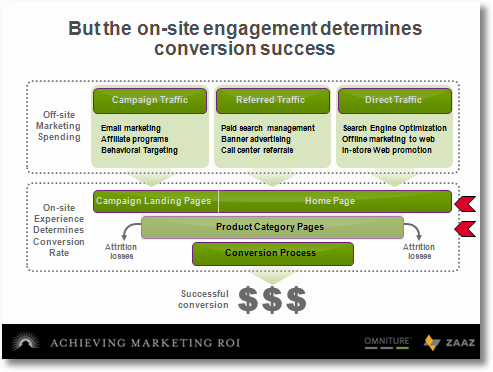
It is very difficult for you to do a kick butt job on your offsite efforts (see traffic sources above) and stink at the onsite stuff, and yet get decent conversion.
You might not put as much into onsite experience creation and optimization but it is critical that if you want to improve conversion (or my favorite “visitor task completion rates“) that you invest and pay attention to those two rows I have highlighted on the slide in red: Landing pages, home page (entry points to the site to ensure you have low bounce rates!) and the core “convince me to buy” content (product category pages).
You can be “da bomb” at acquisition, but the lesson here is to convince your management that you have to invest in a way that you can be “da bomb” when visitors show up on your website.
Customer variables for experience optimization.
I live in the world of web analytics as much as the other guy. There is lots of data and I do lots of analysis. Yet this picture painted such a great story about all the data that we collect (100% non-PII – personally identifiable information)….

In the midst of sifting through visits, visitors and unique visitors etc and averaging all the numbers or aggregating them through WebTrends or CoreMetrics or Omniture or Visual Sciences or Google Analytics we often overlook the fact that we have lots of data about our visitors. Data that can’t be awesome when it comes to understanding behavior……

So here are my action items for you (remember you have already decided based on the first slide above that you are going to give onsite resourcing more love!):
- Print the above slide and keep it handy – it is impressive how it wonderfully categorizes your variables (data pieces you have access to).
- When you are doing your analysis consider segmenting your data by the options you see above – it is a great way to understand not just the aggregate but what is happening in these micro-segments, you’ll be amazed at how actionable your web analytics is now.
- I am a unabashed fan of testing (Dave, that Testing “fanboy” to you!). I am also a advocate of moving beyond simply splitting generic traffic to run tests on. I like the idea of “triggers”. Put visitors into tests when they execute a trigger. The slide above explains all the triggers you can use to put people into tests.
So put people into a test who come from a particular referring domain or it is their fifth visit or they come from Africa or have purchased in the past or who come on a particular offer.The closer you come to testing on micro-segments the more awesome your ROI will be. Use Brent’s list above.
- Testing is passe for you? Been there done that?
Consider onsite behavior targeting to dynamically optimize customer experience on your website. Imagine if you could produce content targeted at people who meet certain Site Behavior or Environment or Temporal or Referral variables, a good BT system can help you deliver it in a scalable manner.
Maybe that is too many action items from one slide! :)
Summary:
Both slides distill and effectively visualize key online marketing facts.
If you want to improve customer satisfaction, conversion rate and task completion rates it is important to ensure that you put the right amount of focus on onsite resources and onsite optimization. Once you have accomplished that tough task start to think of your web traffic not as a monolith but as micro-segments where each person carries a set of variables that you can use to optimize their experience (and your analysis).
What do you all think? What’s your balance between the orange and grey boxes for your company? Have a perfect balance? No? Are you doing segmentation using all the variables in Brent’s slide? What’s missing from the slides above, and this post? Please share your ideas, thoughts, war stories, critique, brickbats via comments.
[Like this post? For more posts like this please click here, if it might be of interest please check out my book: Web Analytics: An Hour A Day.]















19 thoughts on “Marketing ROI Workshop Reflections: Onsite Resourcing & Behavior Variables”
Avinash,
I’d agree that these are issues that plaque the industry. I have a small critique on one of your word choices though ;-)
You said “The slide above explains all the triggers you can use to put people into tests.” I wouldn’t agree that that is all the triggers. Some tools only allow these. However, as our clients successes show you can also segment by buyer preferences (personas) and linguistic cues. I have a great client story to share with you when we see each other next. Sorry I can’t share it publicly yet.
Avinash,
Excellent post! Converting visitors is definitely an issue that I find often gets overlooked. Many client’s that I work with are willing to spend the money to drive traffic to their site, but as everyone in the web analytics world knows that is only half the battle. It’s often not an easy task to convince them that they also need to allocate resources to convert the traffic that they are already paying for either directly or indirectly. Once they see the results, however, the realization hits them and they suddenly begin to understand. :-) It’s just a matter of getting them to see the light!
Avinash – excellent post, echoing my views completely on the total imbalance of most company marketing budgets, from acquisition (huge) to actual conversion/online user experience (miniscule). As Nathan also points out, as our clients have witnessed first hand the ROI benefits of focussing attention (and budgets) on the conversion (or user task completion) aspects of their offering ensure we are preaching to the converted!
By providing expertise in both off-site and on-site areas of marketing our user experience agency is able to provides clients with a win-win service solution, and its great news that our newer and innovative clients are really embracing this combination of services.
For new clients who have yet to be enlightened your prompt to print out the slide will be very useful indeed!
Great Post.
The categorization of variables into four groups though looks simple once done, if not done misses out huge benefits. Each type of behavior have lots to add independently.
I have even faced few business situations where not all groups can be used. One or the other becomes a priority in the business life cycle. Like for fairly new sites demograpic variables gives more actionable insight while for established ones behavior variables.
Avinash, I too find the first slide very interesting. It is common for all of us, but to know that we actually do, it is simply awesome. It calls for the direct action. Thanks for presenting it.
I have a request for you now. If you could write a post for the type of investments that can be done to improve the onsite experience of the customers, that would be really great. We all have something in mind. And I am sure, if we discuss it together we will get lot more than we thinking individually. Hope too one soon.
Thanks again for the very insightful post.
–Bhupendra
Bryan : Excellent point! I should not have used the word “all”. I meant all the “triggers” that you are already collecting from your web analytics data.
There is a little box next to the “four men”, it is a bit hard to read but it says “off line customer variables”. In his talk Brent spoke about using other pieces of data to provide the right experience. Things from the CRM system or store visit / purchase data etc. Your add of “buyer personas” and linguistic variables are perfect add’s as well.
So credit to Brent on that, and a ding for Avinash for writing posts after mid-night and forgetting the little box with tiny text!! :)
Bhupendra : The answer, as always, would be: “It depends”!
But for any business my recommendation would be to fist invest in understanding customers (surveys, site visits, testing etc) and it will be pretty clear what they need to do to fix the experience.
This post might also help with prioritizing your efforts (it recommends a particular order in which things could be done): The Promise & Challenge of Behavior Targeting (& Two Prerequisites).
Hope this helps.
-Avinash.
Avinash,
Simply…brilliant. Nice work. Thanks for distilling this concept into some easy to digest frameworks. Great for getting executive buy in.
Melinda
I had a rather bad day today, however this one just made my day, I’ve read it 3 times and it has cracked me up each time:
Very nice expression! Ive used it before and was told people didn’t say it anymore, but obviously they do ;)
One thing I’d like to mention is that on-page and off-page spending cannot really be seen as completely different:
I think this is extremely obvious in PPC:
The better you make your website (as in the higher the conversion rate/life time value) the more effective you make your PPC campaign as every single keyword becomes cheaper if your conversion rate/LTV increases (it doesn’t become cheaper, but it’s profit margin rises and thus it takes less actual “PPC work” to find profitable keywords)!
This is obviously true for any other form of traffic acquistion..but of course one has to find the right combination of spending and after reading this blog post and the comments obviously people aren’t spending enough on this yet.
I guess any marketer (not web analyst) who reads this doesn’t have a problem with that as they might have just found a new competitive advantage ;)
Wow! Sounds like you guys rocked on the tour. Congrats.
As much as I love on-site optimization I think stating that onsite engagement determines conversion success is not accurate.The greatest gains come from looking at optimization holistically. But even ONLY looking at media we’ve had huge onsite wins from optimizing the offsite factors. It makes perfect sense when you think about it. A few examples:
We did a recent MVT test across an ad and landing and found the ad variables had the highest factors of influence on conversion.
We’ve did a recent test on ads and got a conversion rate increase on the landing page of over 35% based on optimizing ONLY the ad.
It’s great when you can take media and site-side and optimize them together. This is sometimes difficult but we’re seeing a lot more opportunity here as agencies and sites “get it.” I guess we’ll call this the “optimization gap.” :)
Jonathan : I am in 100% agreement on the potential of offsite optimization to deliver the goods. Unquestionably.
Usually though companies are already over investing in off site optimization and under investing in on site optimization. My hope here was to push us all to compute the on site and off site resources and $$ investments and hope to strike a balance (it will never be 50-50, and perhaps it should not be, but it can’t be 98-2 which seems to be the case a lot).
I bet you if your client (the one optimizing only the ad) allowed Otto Digital to implement Offermatica on that landing page then your improvement in conversion would have been 70%!!
I love the term “optimization gap”, it is a Jonathan Mendez pretty SES slide waiting to happen. I call dibs on royalties. :)
-Avinash.
PS: BTW that was six uses of the word “optimization” in your comment, you are living up to the name of your blog (optimizeandprophesize.com)! :)
Avinash,
Your post cracked me up as I have been trying to find a solution/cure to the selective “da bomb” syndrome among certain Management folks:-).
The only thing I would like to add [especially for traditional companies that expanded to online] to your “offsite resources” and “onsite resources” is another dimension — “traditional mass-media resources”.
I have seen folks spend millions on a TV ad and/or print ad but balking on spending a fraction of it on web analytics or in trying to better understand their customers. Of course, I would unabashedly admit that I am biased against those big-spending TV ads that have low conversions (or looking at the half-full picture — biased totally towards using market research and webanalytics to drive customers in and improve conversions) …:-))
Great post.
-Ned
@Ned: Im glad Im not the only one who was cracked up by that post hehe
Great discussion.
In the world of e-commerce, conversion enhancing decisions (on-site optimization) are often being made in a silo. Given convergent media usage, what is the best way to evaluate change in customer on-site usage, cannibalization or traffic mix change between channels?
Sulakshana : I can count on you to ask the toughest question in the simplest of terms! :)
The answer sadly is that it is really hard to do at the moment (and if anyone says otherwise then they are lying!).
You can attempt an understanding through a lot of blood, sweat and tears. When I have done it (and seen others do it) efficient media mix modeling was the answer. I’ll recommend this wonderful article that outlines what it is and the challenges you and I can look forward to:
How to Build a Media Mix Model, by Martin Wesley
Thanks so much for the question, it is very welcome.
-Avinash.
And I count on you to have the answers :)
I’ve worked with BlackFoot earlier; the multi-channel analysis piece has intrigued me since. Part of it is a whole other challenging aspect – changing organizational mindset.
Thanks for the response, Avinash.
SG
Hi Avinash,
I was wondering if for some clients there is a cost issue.
In so many cases traffic generation (acquisition) already has a budget attached to it; spending money to convert traffic less so as demonstrated in your slides.
Do you think there is sometimes a bit of inertia here because it’s often seen as easier, and at least on the face of it less costly and perhaps quicker, to reallocate budget to the most efficient traffic generation sources than spending money on BT tools as mentioned in your post.
Not saying that makes it right….
Hugh : You have hit the nail on the head. I’ll add more more important factor.
The “easy” mindset, that you mention, is compounded by the fact that most companies (atleast in corporate America) structure acquisition and on-site customer experience in different organization silos, with goals and compensation structures that reward meeting silo metrics/goals and not necessarily “end to end” metrics.
This results in someone delivering a visitor and claiming success and someone else now responsible for taking it rest of the way. You can see how that would be problem.
In comment 14, I think, Sulakshana alluded to this in her own sweet and cryptic way as well. :)
Put the “easy mindset” and “silo structure” together and you have a rather sub optimal soup.
Overall BT tools or not on-site customer experience needs a lot more love if you/me/they want to move the dial on “conversion” or “satisfaction”.
Thanks so much for the excellent observation.
-Avinash.
Pingback: User First Web » links for 2007-08-19
Great post, as ever, Avinash. I wrote a post some time ago about why brand awareness isn’t a goal, I wish that post was as eloquent and effective as yours. It’s amazing how many companies still have no issue spending vast sums offline to grow awareness – awareness that has little chance of increasing “visitor task completion rate.” Knowing how frequently marketing budgets get hit when the economy struggles, you’d think more companies would increase their emphasis on driving these “task completion rates.” Even if they call those rates “conversion.”
Pingback: Web Analytics, Business Optimization, Conversion Rate & Segmentation - Praveen Kodur » Praveen:SEO,SEM,PPC,India